Welcome to visit
In flexographic printing, the anilox roller plays a critical role in controlling ink transfer. Its engraved cells carry a precise amount of ink from the ink chamber to the printing plate, directly influencing print consistency, color density, and overall print quality.
However, during long-term operation, ink residues, cell plugging, surface wear, and improper cleaning can gradually affect anilox roller performance. Even a high-quality ceramic anilox roller may lose its original ink transfer characteristics if it is not properly maintained.
For printing companies, anilox roller maintenance is not simply about keeping the roller clean. It also involves monitoring cell conditions, maintaining consistent ink transfer, and identifying potential damage before it affects production.
So, how can you maintain an anilox roller effectively and extend its service life? Here are seven important aspects to consider.
1. Why Is Regular Anilox Roller Maintenance Important?
A ceramic anilox roller features thousands of precisely laser-engraved cells across its surface. These microscopic cells hold and transfer a controlled amount of ink during the printing process.
The cell volume, commonly expressed in BCM (billion cubic microns per square inch) or cm³/m², is an important specification that indicates the ink-carrying capacity of an anilox roller.
During operation, ink components such as pigments, resins, and other solids may gradually accumulate inside the cells. If these residues are not removed properly, they can reduce the effective cell volume and interfere with ink transfer.
Meanwhile, continuous mechanical contact and improper operating conditions may contribute to surface wear or damage.
Both conditions can lead to insufficient ink transfer, inconsistent color density, and unstable printing results.
Regular maintenance helps prevent these problems and allows the anilox roller to maintain more consistent performance throughout its service life.
2. What Causes Anilox Cell Plugging?
Cell plugging is one of the most common problems affecting anilox roller performance.
During printing, ink residues may remain inside the engraved cells. If the roller is not cleaned promptly after a print run, these residues can dry or harden and gradually accumulate along the cell walls and bottoms.
Different ink systems can produce different types of deposits.
For example, water-based inks may leave dried pigment and resin residues, while UV-curable inks can become difficult to remove if they are exposed to UV light and cured inside the cells. The exact cleaning requirements depend on the ink formulation and its drying or curing characteristics.
As deposits accumulate, the available cell volume decreases, reducing the amount of ink that can be carried and transferred.
One important point is that an anilox roller may look clean on the surface while its cells remain partially blocked.
Routine wiping can remove surface ink, but it may not effectively eliminate hardened deposits deep inside the cells. This is why visual inspection alone is not always sufficient to determine whether an anilox roller is completely clean.
3. How to Choose the Right Anilox Roller Cleaning Method
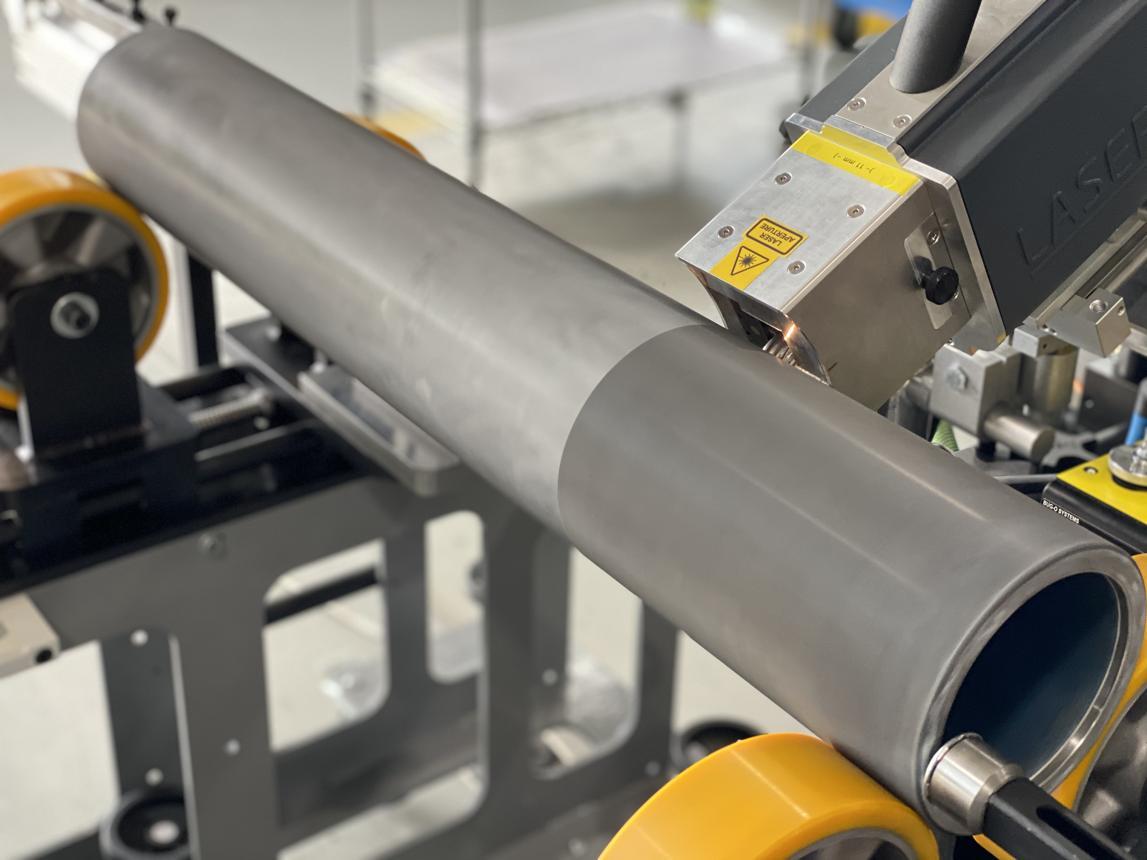
Choosing the correct cleaning method is essential for removing ink residues without damaging the ceramic surface or engraved cell structure.
The appropriate method depends on the ink type, level of contamination, cell specifications, and roller manufacturer's recommendations.
Common anilox roller cleaning methods include:
Chemical Cleaning: Specialized cleaning solutions are used to soften and dissolve ink residues. This is suitable for routine maintenance when the cleaning agent is compatible with the ink system and roller materials.
Ultrasonic Cleaning: Ultrasonic energy helps loosen deposits inside engraved cells. It can be useful for deep cleaning, but the cleaning solution, temperature, treatment time, and equipment compatibility must be carefully controlled.
Laser Cleaning: Specialized laser equipment removes ink deposits from the engraved cells through a controlled cleaning process. It should be performed by qualified professionals using equipment and parameters appropriate for the roller.
Media-Based Cleaning: Specialized cleaning media and equipment are used to remove stubborn deposits. The media type, pressure, and operating conditions must be properly selected to avoid surface damage.
It is important to understand that stronger cleaning does not necessarily mean better results.
Aggressive chemicals, excessive mechanical force, or unsuitable cleaning procedures may damage the ceramic coating or affect the engraved cell structure.
For this reason, always follow the recommendations of the anilox roller manufacturer and cleaning equipment supplier. Avoid using unapproved chemicals or abrasive tools that may damage the roller surface.
4. How to Identify Cell Plugging vs. Anilox Roller Wear
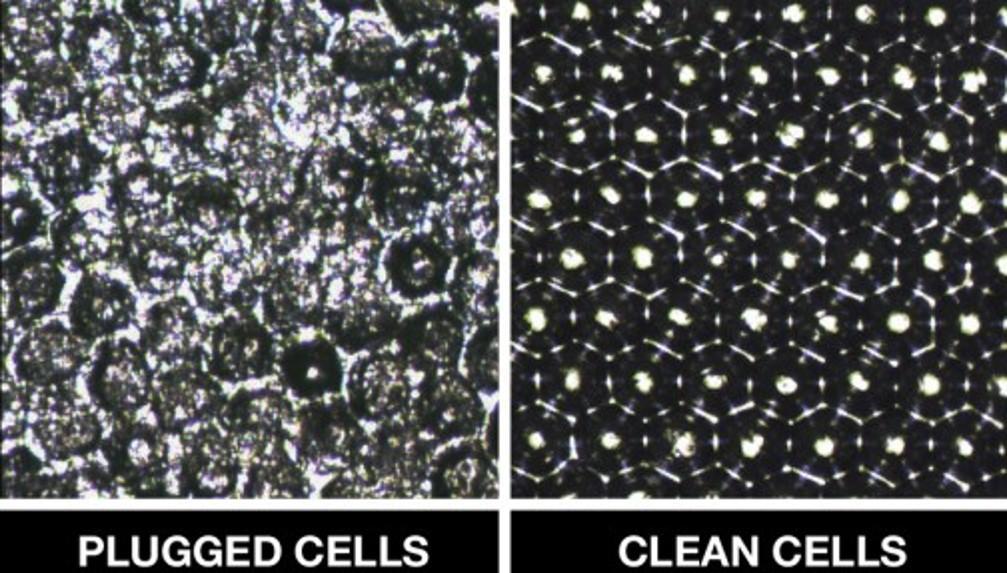
Cell plugging and cell wear can produce similar printing symptoms, particularly reduced ink transfer. However, they are different problems and require different solutions.
Cell Plugging
Cell plugging occurs when dried ink, pigments, resins, or other deposits accumulate inside the engraved cells.
The deposits reduce the effective cell volume and prevent the cells from carrying their intended amount of ink.
In many cases, appropriate deep cleaning can remove the deposits and restore some or most of the original cell capacity.
Cell Wear
Cell wear develops over time due to mechanical contact, operating conditions, and other forms of surface degradation.
Unlike plugging, wear involves physical changes to the engraved cell structure or ceramic surface. Cleaning alone cannot restore material that has already been worn away.
So, how can you tell the difference?
First, use a suitable microscope to inspect the engraved cells. Look for ink deposits, partially blocked openings, damaged cell walls, or visible surface defects.
Second, use professional anilox volume measurement equipment to evaluate the current cell volume. Compare the results with the original manufacturing data or previous reliable measurements taken using the same method.
If the measured volume increases significantly after proper deep cleaning, cell plugging was likely contributing to the problem.
If the volume remains lower than the original specification after cleaning, wear or other surface damage may be involved and should be investigated further.
It is also important to consider ink properties, doctor blade conditions, and printing press settings. Cell volume alone does not determine actual ink transfer, so inspection results should always be evaluated together with printing performance.
5. How Doctor Blades and Ink Conditions Affect Anilox Roller Performance
Anilox roller maintenance does not depend on the roller alone. Doctor blades and ink management also play important roles in maintaining stable printing performance.
Doctor Blade Conditions
The doctor blade controls the ink remaining on the anilox roller surface while allowing ink inside the engraved cells to pass through the printing process.
Excessive blade pressure can increase friction and accelerate wear on both the blade and the anilox roller.
On the other hand, insufficient or uneven blade contact may result in poor ink metering, streaks, and inconsistent ink transfer.
Regularly inspect the doctor blade for wear, chips, deformation, and other defects. Check its installation and contact conditions to ensure proper operation.
Ink Management
Ink properties also influence how effectively the engraved cells fill and release ink.
Factors such as viscosity, pH (for water-based ink systems), temperature, drying characteristics, and contamination can affect printing performance.
Maintaining ink conditions within the ink supplier's recommended range helps reduce printing instability and unnecessary deposits inside the anilox cells.
When ink transfer problems occur, do not immediately assume that the anilox roller is damaged. Check the doctor blade, ink properties, ink delivery system, and press operating conditions as well.
A systematic inspection can help identify the actual cause and prevent unnecessary cleaning, repair, or roller replacement.
6. When Should You Clean, Repair, Re-Engrave, or Replace an Anilox Roller?
When an anilox roller develops performance problems, replacement is not always the only option.
The appropriate solution depends on the type and severity of the damage.
Deep Cleaning: If cell plugging is the main problem, professional cleaning may help remove deposits and recover the effective cell volume.
Repair or Reconditioning: If the roller has surface defects or coating-related issues, a professional assessment can determine whether restoration is possible.
Re-Engraving: If the existing cell structure has experienced significant wear, reconditioning and re-engraving may be considered, provided the roller core, coating condition, dimensions, and overall structure are suitable.
Replacement: If the roller has severe structural damage or the cost of restoration is no longer economical, replacing it may be the more practical solution.
Not every used anilox roller is suitable for re-engraving. Its condition, manufacturing history, and technical specifications should be evaluated by an experienced manufacturer or service provider before making a decision.
The goal is not simply to extend the roller's service life, but to maintain reliable ink transfer and consistent printing quality at a reasonable operating cost.
7. Establish a Regular Anilox Roller Maintenance Schedule
For printing companies operating multiple flexographic presses, maintaining an individual maintenance record for each anilox roller is highly recommended.
A maintenance record should include:
Roller identification number and corresponding printing machine.
LPI and BCM specifications.
Ink types and printing applications.
Routine cleaning and deep cleaning records.
Periodic anilox volume measurement results.
Surface inspection findings and repair history.
By tracking this information over time, operators can better understand each roller's condition, identify changes in performance, and plan maintenance activities more effectively.
A well-organized maintenance program can also reduce unexpected downtime, avoid unnecessary roller replacement, and improve overall production efficiency.
Conclusion
Anilox roller maintenance involves much more than routine cleaning. It requires proper cell inspection, effective cleaning procedures, appropriate doctor blade settings, and regular performance monitoring.
Timely cleaning helps prevent cell plugging, proper operating conditions reduce unnecessary wear, and professional volume measurement helps identify changes in anilox roller performance.
For flexographic printing companies, choosing the right anilox roller and following a consistent maintenance program are essential steps toward achieving stable print quality and efficient production.
JCTPRINT specializes in manufacturing high-quality ceramic anilox rollers, offering customized solutions based on LPI, BCM, roller dimensions, and printing machine requirements. With a focus on precision engraving and application-specific specifications, JCTPRINT supports flexographic printing operations across a range of industrial applications.